
How to Whitelist and Allow 3rd Party iFrames to be embedded within the Froala Text Editor
Link: https://support.brilliantdirectories.com/support/solutions/articles/12000072585
By default, the platform allows iframes from YouTube, Vimeo, Facebook, SoundCloud, X (Twitter) and Google. Iframes from other platforms that share content through iframes are blocked by the platform for security purposes.
To allow another source, add the domain that provides the iframe content to the comma-separated list in this Advanced Setting:
Settings » Advanced Settings » Text Editor » Permissions » Allowed Iframe Sources
System Variable: iframe_source_whitelist
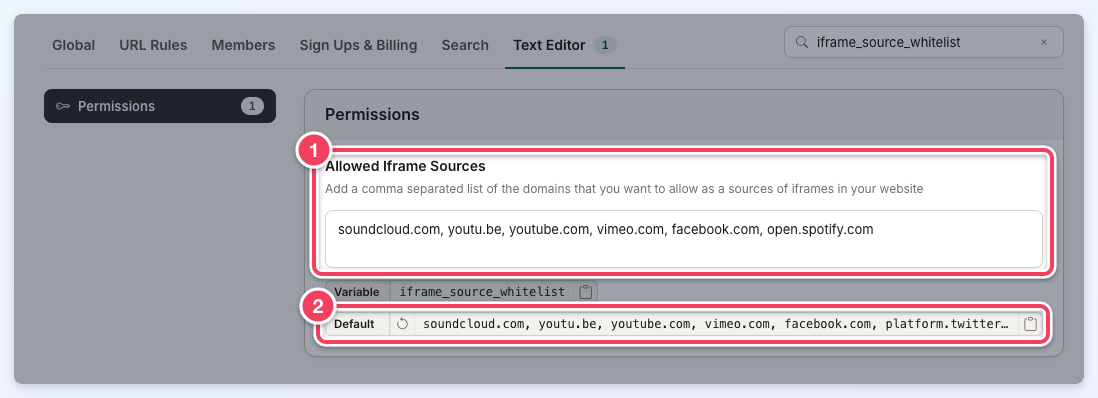
The Allowed Iframe Sources list (1). The Default chip (2) shows the platform's default list, soundcloud.com, youtu.be, youtube.com, vimeo.com, facebook.com, platform.twitter.com, google.com, and its restore button puts that list back.
Once the domain of the website providing the iframe has been added, the content shows up as soon as the iframe is shared on the site.
Auto-saved web page drafts
The same list decides which embeds are kept in the drafts that the Edit Web Page editor auto-saves. An iframe whose address uses https:// on an allowed domain, or a subdomain of one, is kept in the draft; an iframe from any other source is left out of the draft. A draft that is missing embeds the saved page has is not restored when the page is opened again. See Auto-Save Drafts in Settings » Advanced Settings.
Important: sharing content through iframes should be supported by any Froala editor on the site.
