
How To Access Webmail Through the Admin Area
Link: https://support.brilliantdirectories.com/support/solutions/articles/5000559800
Webmail reads and sends a mailbox's email in the browser, with no mail program to set up. The admin opens it from Settings > Domain Manager > Mailboxes, and for administrators whose role can open the website's cPanel it signs in to the mailbox without asking for the mailbox password.
Before starting
- The website must use a custom domain with at least one mailbox on its hosting. See Settings » Domain Manager » Mailboxes and Email Routing to create one.
- Allow pop-ups for the admin, because webmail opens in a new browser window.
Open a mailbox in webmail
- Open Emails > Email Accounts, or Settings > Domain Manager and select Mailboxes.
- Find the mailbox in the Mailboxes list.
- Click Open webmail.
- The mailbox's inbox opens in a new window, already signed in.
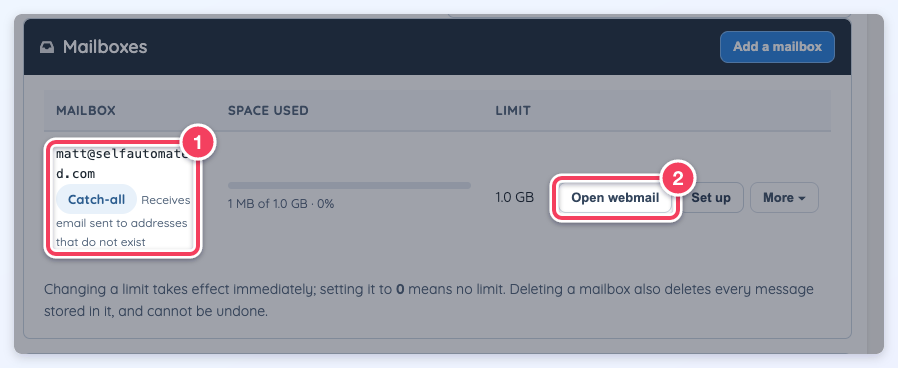
Open webmail (2) on a mailbox row. The Catch-all label (1) marks the mailbox that receives mail sent to addresses that do not exist.
If the password is requested
- The administrator's role cannot open cPanel. Signing in without the password is limited to administrators who can already open the website's cPanel, where cPanel's own Check Email does the same. For other administrators, Open webmail opens the webmail sign-in page; enter the full email address and the mailbox password there. A forgotten mailbox password can be replaced with More > Change the password on the mailbox row.
- The mail server could not sign in. The new window shows the webmail sign-in page instead, and a message explains that the mailbox password is needed there.
- The browser blocked the window. A message asks to allow pop-ups for the page. Allow them, then click Open webmail again.
Catch-all mail
Mail sent to addresses at the domain that do not exist can be kept in the account's own mailbox (Keep in the catch-all mailbox). That mailbox is then listed as The account's own mailbox with the Catch-all label, and Open webmail is the way to read its mail.
Additional notes
- Each signed-in opening is recorded in the website's notifications as Webmail opened for the mailbox.
- For administrators without cPanel access, Open webmail links to the website's address followed by /webmail, such as https://www.example.com/webmail, which is the webmail sign-in page and asks for the mailbox password.
- For help using the webmail program itself, see the cPanel documentation.
